Git: Revert file after conflict

 Git: Revert file after conflict

Suppose your file got conflicted after taking pull and want to revert changes then use below command.


git checkout HEAD my/filename.js

Reference: 
https://stackoverflow.com/questions/22565184/git-how-to-revert-after-a-merge-conflict-corruption

Switch node versions using nvm

 Switch NodeJs versions using nvm


List all nodejs versions available

nvm ls-remote


Install specific version

nvm install 14.18.1


Install latest nodejs

nvm install node


List nodejs versions available in the machine

nvm ls


Switch to nodejs version

nvm use 16.13.0


Uninstall nodejs version

nvm uninstall 16.13.0

Git: Get changes from another branch

 Git: Get changes from another branch 


Suppose you are working branchA and somebody merged changes to main branch. You want pull latest changes from main to branchA.

option 1

git checkout main

git pull

git checkout branchA

git merge main


option 2

git rebase main


option 3

git pull origin main


Git: Save user credentials

 Git: Save Username and Password


To avoid prompting username and password, run below command

git config --global credential.helper store

then

git pull


Reference: https://stackoverflow.com/questions/35942754/how-can-i-save-username-and-password-in-git 

React: File download

 React: File download


Got a requirement to save api response data (blob) to a file.


setLoading(true);
const responseData = await callApi();
setLoading(false);
var blob = new Blob([responseData], { type: "application/json" });
let url = window.URL.createObjectURL(blob);

// Creating the hyperlink and auto click it to start the download
let link = document.createElement("a");
link.href = url;
link.download = "samplefile.json";
link.click();

GIT: Edit last commit message

 GIT: Edit last commit message (not pushed)


git commit --amend -m "New commit message"

Reference
https://stackoverflow.com/questions/179123/how-to-modify-existing-unpushed-commit-messages

React: Preload Images

 React: Preload Images


I had a situation that lot of time taken to load images, which are loaded dynamically. One solution was to preload the images whenever we get the URL so that images will be available in cache and it will load quickly.

Below solution worked

useEffect(()=>{
images.forEach((image) => {
const img = new Image();
img.src = baseurl + image.fileName;
});
}, [])


References:

https://stackoverflow.com/questions/42615556/how-to-preload-images-in-react-js


Tailwind CSS: Dark and Light Theme

 Tailwind CSS: Dark and Light Theme 

I am using Tailwindcss in my react app. One of the requirement was to provide light and dark theme for the web app. This can be achieved easily with Tailwind.

1. Specify colours and styles for light and dark theme. For light theme just use class-name as it is and for  dark theme, use dark:class-name.

eg: bg-white dark:bg-gray-700


Switch between white and dark theme

To switch between the themes, there are many methods. I chose using class. Using class, need to mention darkMode: "class" in tailwind.config.js.

/** @type {import('tailwindcss').Config} */
module.exports = {
darkMode: "class",
theme: {
extend: {},
},
plugins: [],
content: ["./src/**/*.{js,jsx,ts,tsx,html}", "./public/index.html"],
};

Then we can add a button, on click add/remove class-name "dark" to/from <html> to toggle between dark between light theme.

document.documentElement.classList.toggle("dark");

or 

document.documentElement.classList.add("dark");
document.documentElement.classList.remove("dark");


Note: To keep the theme selection, we can store the value to localstorage and retrieve it on  load for better user experience.


Reference: https://tailwindcss.com/docs/dark-mode


Git: Pulling is not possible because you have unmerged files

 Git: Pulling is not possible because you have unmerged files


Some times I receive this message because local file file changes conflict and requires merging. To revert local changes  in this scenario, use below command

git reset --hard HEAD

If already committed to local branch and need to revert the last committed changes,

git reset --hard HEAD~1

React Router V6 (react-router-dom) Dynamic Routing

 React Router V6(react-router-dom) Dynamic Routing


I was trying to implement dynamic routing with router v6 similar to that with v4 . 

eg in v4

const routes = [
{ path: '/', key:"home", component: Home },
{ path: 'page1',key:"page1", component: Page1 },
{ path: 'page2', key:"page2" component: Pag2 }
];


<Route path={variable} component 

<Router>
<Switch>
{routes.map(page => (<Route key={page.key} path={page.path} component={page.component} />))}
</Switch>
</Router>

This can be achieved in router v6 using useRoutes

Router.tsx

import { useRoutes } from "react-router-dom";

import Home from "../pages/Home";
import Page1 from "../pages/Page1";
import Page2 from "../pages/Page2";

export default function Router() {
return useRoutes([
{ path: "/", element: <Home /> },
{ path: "/page1", element: <Page1 /> },
{ path: "/page2", element: <Page2 /> },
]);
}


App.tsx

import React from "react";
import { BrowserRouter } from "react-router-dom";
import Router from "./helpers/Router";
function App() {
return (
<div>
<BrowserRouter>
<Router />
</BrowserRouter>
</div>
);
}

export default App;

References:

https://reactrouter.com/en/main/hooks/use-routes


React : Disable Browser Forward and Backward Button or Prevent Navigation

 React : Disable Browser Forward and Backward Button or Prevent Navigation 


To prevent navigation to specific route, we need to use history.block() - https://github.com/remix-run/history/blob/dev/docs/blocking-transitions.md


The browser backward button click action will be pop() and the browser forward button click action will be push(). We need to listen and handle these actions to block navigation.  


Format multi-line sql queries to single line


Format multi-line sql queries to single line queries

I had a requirement to change multi-line sql queries to single line queries.

UPDATE table_name

SET

    column1=value

WHERE

    condition=value1

    AND condition2=value1;

UPDATE table_name

SET

    column1=value2

WHERE

    condition=value2

    AND condition2=value2;

to

UPDATE table_name SET column1=value WHERE condition=value1 AND condition2=value2;

UPDATE table_name SET column1=value2 WHERE condition=value2 AND condition2=value2;


I have tried different sql formatter in VS Code and Notepad++, all formatting into multiple lines.


Then I came to below stackoverflow link and achieved single line format in in two steps.

Step 1: replace all (?:\h*\R\h*)+ with space

Step 2: replace all with ;\r\n


References

https://stackoverflow.com/questions/52003347/notepad-turn-big-query-from-sql-server-into-one-line


How to buy a car in Mississauga, Ontario, Canada

How to buy a car in Mississauga, Ontario, Canada

Car is a must in Canada especially when you living with family. I decided to buy my first car before the winter so that shopping during winter will be easy. My conditions,

  • accident free. ( Check the Carfax report for accidents)
  • budget: $10-15k
  • year: 2014+
  • km : below 120k
  • transmission: automatic

I had following models in my mind -Toyota Corola, Camry, MiniCooper, Honda Civic, HRV, CRV, Nissan Rogue. Many of my friends were using Toyota Corolla, very old model, still they were reliable. 

I have started my search in Facebook market place and Kijiji. Initially I just replied to ad and never went to see the vehicle. It became habit, and one day I went out to see a vehicle. It was a Nissan Rogue 2014 model which I didn't like because it looked very old even though in picture it looked good. Many of my friends recommended SUV because it will be convenient for trips and moving items.

After that every weekend I rented car and went out to see different vehicles. Honda Civic and CRV at Precision Honda. I didn't like Civic because some sound was coming from the vehicle. Toyota Corolla, Camry at Attrel Toyota. Corolla was good but expensive. There were showrooms of almost every auto company near by Attrel Toyota, Brampton. We have explored maximum there. Every time I found some problem or the car value was out of budget.

I have created custom filters kijiji auto. Also started looking at other sites - Carguru, autotrader,... One day I went to see a VW Jetta - 2017 model. It was a good vehicle and cheap. It was almost closed the deal. Then I figured out that resale value of Jetta is very low, don'y know why it is so. Another day, we found one of our neighbour has listed their MiniCooper in Kijiji. It was really a good car. We were confirmed to buy it. But unfortunately they changed their mind and they didn't sell their car.

Finally, fall already started, I found Nissan Rogue from a private seller in Kijiji. Even though vehicle is old, the owner explained everything well which I really liked. The vehicle looked in great condition. Also he provided winter tire. He did safety and did everything for registration. I just needed to arrange the draft on his name and Insurance proof.

Insurance

Insurance is expensive in Canada. Also it is mandatory and required for registration. I have took quotes from different companies in the weekend and started calling different insurance companies early Monday morning. Took quote from TD Insurance, RBC, Allstate, Cooperators, Aviva etc. The insurance company will ask for the description of the vehicle. All the information will be available in the CARFAX report. if VIN is available we can take the carfax report. TD gave the cheapest quote so bought it.

Registration
Need to arrange following for changing ownership from Service Ontario,

  • The Used Vehicle Information Package - Need to fill.
  • A signed Bill of Sale with your name, the buyer’s name and address, the date and purchase price .
  • A completed and signed Application for Transfer — this is found on the back of an ownership permit, under the vehicle portion.
  • A certificate that verifies the vehicle meets safety standards.
  • Proof of insurance in your name for the vehicle. 
We met at Service Ontario. I took appointment so no needed to wait. It was smooth process. Gave all the documents. Officer verified all the docs, paid 13% tax + fee for plate. Officer then went inside to get the plates and sticker. She came back with my plates. And yes, we became the new owner. 

Here are the links that I found helpful:

https://www.ontario.ca/page/buy-or-sell-used-vehicle-ontario#section-1
https://www.ontario.ca/page/safety-standards-certificate
https://www.ontario.ca/page/register-vehicle-permit-licence-plate-and-sticker#section-2

G2 Driving Test Experience in Brampton, Ontario, Canada

G2 Driving Test Experience at Brampton, Ontario, Canada

I had my G2 driving test yesterday at Brampton DriveTest Centre, Ontario. I was well prepared and have taken many practical driving lessons from a driving school. I have used the same driving school car for the test. I have reached Brampton test center about half an hour before the scheduled test time with my g1 license. The driving school teacher made me drive through the G2 test route and parked at one of the numbered spots.(noted slot number). I was bit nervous as everybody, driving teacher also accompanied and guided me.

There was big crowd of people in front of the center, but for road test no need to follow the queue. We just need to wait near the door and they will call when it is our turn. They called me at correct time, I needed to sanitize my hands (COVID protocol) and enter details on the kiosk inside. We need to enter

 1. driving license number

2. make of the car

3. colour of the car

4. car plate number 

5. parking spot number. 

Also the there were 2 question asked in kiosk,

1. Any vision problem?

2. Any medication?

A slip will be generated after providing the details and I am instructed to wait inside the car with the slip. A driving instructor came after some time. He told me to horn, put left and right indicator, etc. Then he got into the car and confirmed my license details again with his tablet. After verifying, he told me to take the car left when it is safe. I put indicator, checked mirrors and blind spot and moved carefully. Then followed 3-point turn and parallel parking. Road rote was similar to this video route - https://www.youtube.com/watch?v=GhVyRNO6HSM, (means took left from drive test center). There was no flashing speed signal as school was closed for vacation. Also did uphill parking and in the end forward parking. I made small mistakes like missing checking blindspots in some places, however I passed the test. The instructor was really good and helpful. 

After passing the test, I went again inside drive test centre for temporary g2 driving license. There was separate line for this. I got my upgraded driving license in 5-10 minutes. Overall process was smooth at Brampton DriveTest Center.


Prepare for G2 Driving Test in Ontario

 Prepare for G2 Driving Test in Ontario

I have done following for the preparation for Ontario G2 (G1 Exit) Driving Test in Ontario.

1. Refresh knowledge on Ontario driving rules and signs

2. Watch videos from youtube on driving, especially test video at drive-test center.

3. Find a driving instructor and get familiarized with the vehicle (Switching on the vehicle, operating indicators, vipers, parking, changing gears, accelerator and brake, etc.)

4. Starting vehicle:

a Make sure to put seat belt and adjust seat and mirrors.

b. Left signal and check mirrors and blindspot.

c. Move forward.

5. 3 point turn

a. Right signal, check mirrors, blind spot move right of street.

b. left signal, check mirrors, blindspot, full left and move left.

c. signal right, check all around, change gear to reverse, steer full right, move backward 

d. signal left, check mirrors and blindspot, steer left and move forward

Videos - https://www.youtube.com/watch?v=gpTbAnNAKww

http://www.mto.gov.on.ca/english/dandv/driver/handbook//section2.6.12.shtml

6. Parallel parking

a. Right signal, check mirrors, blind spot move near to the reference car so that tail lamb is visible at back small window of the car.

b. One full round steer right, reverse gear, check around, move backward so that front side mirror is parallel to back of reference car.

c. Straighten wheel (steer one full left) , check all around, move backward so that back wheel near to curb in the sideview mirror.

d. Full left steel lock, check all around, move backward, when parallel, straighten wheel, park, hand break

References: https://www.youtube.com/watch?v=Mpo6fcaWfC4

https://www.youtube.com/watch?v=097tL24VJDo

http://www.mto.gov.on.ca/english/dandv/driver/handbook//section6.10.0.shtml   

7. Check mirrors often

8. Full stop at stop sign and count 1, 2, 3 and move forward. (difference between stop and all-way - stop).

9. Left turn: Signal, check mirrors, blindspot, pedestrians, incoming traffic, correct lane.

10. Right turn:  

a. Signal, check mirrors, blindspot, pedestrians.

b. if red,  stop, check, no vehicle, no pedestrian and go. if green, no stop, check no pedestrian and go

11. Follow speed posted. If not posted 50km/hr. Check for flashing speed post. If traffic, follow traffic speed.

12. Lane changes:

a. signal, check mirrors, blindspot and change lane if safe.

b. Follow speed, steer smooth while changing lane.

c. Move to right after left turn

13. Follow traffic signals. Do not enter in yellow.

14. Uphill and Downhill parking:

a. signal right, check mirrors, blindspot.

b. park, hand break. max 1 feet(30 cm) from curb

c. Up hill -> steer left, down hill -> steer right

d. Turn on hazard light, if emergency stop

15. Look both sides while pass through intersection, railway cross, drive ways, etc.

16. Pull ove for emergency vehicles

17. Yield for bus

18. Forward parking:

a. signal, check mirrors, blindspot, move to parking spot

19. Reverse parking

a. Signal right 

b. Count 1, 2, 3. Shoulder middle of 3.

c. Steer full right, check mirrors, all around, move reverse

d. Straight wheel when vehicle straight

e. park, hand break

Videos: https://www.youtube.com/watch?v=ZQOTf4YF1ec

https://www.youtube.com/watch?v=x0VFdKYz9u8


Assembling a Bedframe - Zinus - Amazon


Assembling a Bedframe - Zinus - Amazon

I bought  a new bed-frame from Amazon. Zinus Upholstered Diamond Stitched Platform Bed in Dark Grey, Full - https://www.amazon.ca/gp/product/B01M580E2K/. It is good and easy to assemble. Below are the pics how I assembled it from a single box to full bed-frame.


Download private video from youtube

Download private video from youtube
I wanted to download video from youtube. It was a private which I had access for a limited time period. I tried different extensions in chrome browser but nothing worked. Downloaded many desktop applications but they were not helpful to download private videos.

Finally I tried with Edge browser and it worked. Similar to chrome browser, there are add on/extension in edge browser. I added extensions to download video (video downloader, all site video downloader,.. you will find many) and while playing video in youtube, the video can be downloaded. I could save the video in my computer using this method, hope you will also able to do it.

How to clean up phone storage: Clean up Whatsapp Data in Android Phone

 How to Clean up Phone Storage: Clean up WhatsApp Data in Android Phone


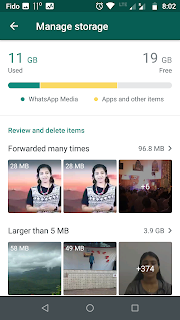
whatsApp has been eating up all the space in my phone. I followed below method to delete data came from WhatsApp which saved a lot of space in my phone and it is faster now.

1. Go to Settings > Storage and data


2. Go to Manage storage


3. WhatsApp will show which all files/data are forwarded/huge in size. We can simply select and delete. 


This option was very helpful for me. There was around 30-40gb data present in WhatsApp folder. Using this option I could recover the space efficiently.


My CELPIP (Canadian English Language Proficiency Index Program) Test Experience

 My CELPIP Test Experience

I have been preparing for CELPIP (Canadian English Language Proficiency Index Program) Test for processing Canada PR. CELPIP is completely computerized test, even speaking is computerized which is why I selected CELPIP over IELTS. The CELPIP test has 4 sections Listening, Reading, Writing and Speaking. Study materials and support are less available compared to IELTS.

Preparation

1. MAD English TV: - https://www.youtube.com/playlist?list=PL2-SI2qqn8uSQXIgGsEAWKf6IMh9muHMp

2. CELPIP Lessons 

Almost 2-3 months, I have been referring youtube videos, CELPIP materials to familiarize with the test. I was not fluent in english as I was coming from non-english language background. Along with me, my friends also joined for the CELPIP mission. We met together in google meet and solved many sample questions. This was very effective and we have improved a lot by learning and sharing. At least we have learnt more english which made us more confident.  

Obviously, speaking was the most difficult in the beginning. It has 8 tasks. I have initially followed MAD English youtube channel. It was very useful as we got many tips from his videos. Basically you need to have good ideas and speak the whole time without mistakes. In all the tasks, give an introduction, explain your content and conclude. Be polite and positive while you speak. 

  • Task1-Giving advice: Difficult if question is long and tough. Need to speak 90 seconds. can use: It will be good, if you..., I would suggest..., I would recommend..., 
  • Task 2-Talk about past experience: Use past tense. Mention date, time, place, feelings ...
  • Task 3: Describing a scene: vocabulary is important. Also start with an intro and describe things in the picture.
  • Task 4: Making predictions: can start thinking about predictions from the previous task itself. Try to make interesting predictions. Use future tense. Eg: will be, is going to,...
  • Task 5- Compare and persuade : This task has more time and easy to make sentences as points are already given. Make sure you understand the situation. Acknowledge the other option. Eg: Hi John, I know you want to go with option 1, but I think option2 will be a better option because of several reasons... Try to use better vocabulary, like comparing prices you tell one is cheaper or expensive instead of calling out prices.
  • Task 6- Dealing with difficult situation: comparatively easy as preparation time is 60 seconds. Understand the situation, be polite and soft.Eg: I am so sorry about that..., I hope you understand my situation...
  • Task 7-Expressing opinions: may not get enough time to prepare and need to speak for 90 seconds. So it will be difficult if questions is tough. Try to find out 3 points as opinions and elaborate. Add stories and facts if you are not getting anything to speak. eg: I think..., In my views...
  • Task 8- Describe unusual situation: This is the toughest task for me. We won't get time to read and understand question. Usually this phone call task, So you need to call and introduce yourself. eg: Ho John, this is Jim here.... We will get some strange pictures and it will be cross between animals or some strange thing that we have never seen. Describe as much as you can and try to accomplish task completion.  

After speaking, listening is the second most difficult section and it is the first section in the exam. Listening has 6 tasks including a video section. I felt it difficulty level increases from 1 to 6. We have purchased study materials from CELPIP and worked out it. Some of the sound recordings were easy to understand but some are difficult. Also, the questions are tricky sometimes. I used to take note for listening tasks. But many of my friends find it difficult to take note and scored high when they are just listening. 

Reading was somewhat a relief that we could score at least 7 in every practise test we took. It has 4 sections. Here also, difficulty level increases from 1 to 4. Task 3: Reading for information. We need to find the paragraph A,B,C, D corresponding to the statement or E which means statement belongs to none of the paragraphs. For this you can read all paragraphs first and match the statements which I am following. But my friend used to read first paragraph and find all options belongs to that paragraph, then go to the next paragraph and so.

Writing has only 2 tasks email writing and responding to survey questions with enough time. I followed MAD english videos and books, and it was useful. Please find below some useful phrases and sentences. 

Email

  • Greeting: Informal- Hi John. Formal: To whom it may concern, Dear John, Dear Store manager, Dear Mr. John
  • Ending: Thanks, Thanks and Regards, Warm regards, Sincerely, Yours faithfully
  • I am writing to you to inform you...
  • I am writing to express a concern I have about a...
  • I just wanted to send you a quick email to...
  • I am writing this email in response to your earlier email to...
  • I am writing this email to seek your assistance to...
  • It would appreciate if you can send...
  • I am writing to you in regard to...
  • It looks much better now
  • I would be happy to provide you with any other information you might need...
  • I appreciate the opportunity to provide input on this issue.
  • I will be eagerly waiting for your response.
  • I look forward to your response.
  • Looking forward to seeing you next month.
  • I would like to bring to your attention
  • I would like to suggest
  • Thank you for taking this into consideration, and I look forward to...
  • May I suggest /propose implementing  
  • I'm so sorry to say that a situation has come up...
  • I really appreciate your kindness and patience!
  • I look forward to hearing from you.
  • I am afraid that I may not be able to..
  • I will not be in a position to support..
  • Accept my sincere apology for the inconvenience caused and I look forward to your support and co-operation in this matter.
  • on Friday, May 10, 2020, at 5:45 p.m., at Square one mall.
  • I would be happy to provide you with any other information you might need.
  • I believe this information to be true to the best of my knowledge.

Survey  

  • I personally think
  • Even though public transport is slow, people can save money in commuting and parking. 
  • Considering these reasons, I believe it would be better for..
  • I appreciate the opportunity to provide input on this issue.  
  • Another reason why I think 
  • I prefer...
  • First of all, ..., in addition to that
  • Moreover, ...
  • Again, these are my personal belief, but I will support whatever the company decide to do.


Exam experience

I was very confident for the CELPIP test as I was prepared well. We had put a lot of effort and was ready to take any scenario for speaking tests. The exam was 3 hours and due to pandemic I had to wear mask during the exam. Also, I haven't given such a long exam in recent times. So after listening and reading, I was completely burnt out. I could somehow complete writing section. But once speaking started, I was so tired and time was flying like rocket. The speaking sections went very fast and I was not able to perform well. I was so disappointed after the exam. My suggestion to you is to take complete test while you work out mock tests, which was one mistake we did during our practise. Also I was expecting some questions from CELPIP materials, but nothing repeated. Anyway, I am sure that one day I will crack the CELPIP test.