Showing posts with label Android. Show all posts

How to clean up phone storage: Clean up Whatsapp Data in Android Phone

 How to Clean up Phone Storage: Clean up WhatsApp Data in Android Phone


whatsApp has been eating up all the space in my phone. I followed below method to delete data came from WhatsApp which saved a lot of space in my phone and it is faster now.

1. Go to Settings > Storage and data


2. Go to Manage storage


3. WhatsApp will show which all files/data are forwarded/huge in size. We can simply select and delete. 
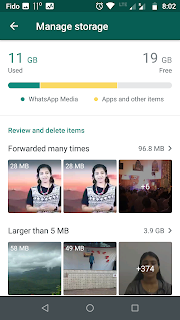


This option was very helpful for me. There was around 30-40gb data present in WhatsApp folder. Using this option I could recover the space efficiently.


Date Picker in Android: Set Date using DatePickerDialog


public void onClick(View v) {

if(v== ( (Button) findViewById(R.id.date_button) ))
{
// Getting current date
final Calendar c = Calendar.getInstance();
        int  mYear = c.get(Calendar.YEAR);
         int mMonth = c.get(Calendar.MONTH);
        int  mDay = c.get(Calendar.DAY_OF_MONTH);

         // Launch Date Picker Dialog
         DatePickerDialog dpd = new DatePickerDialog(this,
                 new DatePickerDialog.OnDateSetListener() {

                     @Override
                     public void onDateSet(DatePicker view, int year,
                             int monthOfYear, int dayOfMonth) {
                     

   // Setting Selected date in edit text box
                         edit .setText(dayOfMonth + "-"
                                 + (monthOfYear + 1) + "-" + year);

                     }
                 }, mYear, mMonth, mDay);
         dpd.show();

}
}